

How to Play Turf War
Trying to figure out how to best your neighborhood rival in a game of Turf War? This is the place to be! Whether you prefer a how-to-play video, a manual, a playthrough video, or step-by-step instructions, we’ve got you covered.
Need help with a card?
Objective
In Turf War, players compete over a series of turns to earn the most points by the time that the last emoji_people Neighbor is swayed. On your turn, you’ll decide if you’re house Home or directions_car Away. When you’re house Home, you can play cards from your hand to improve your Yard and sway emoji_people Neighbors. When you’re directions_car Away, you can earn money and buy more cards – but you leave your Yard vulnerable to your rival’s mischief.
Setup

1. Put a Home, a Garage, a Piggy Bank, and a 3×3 grid of Dirt (their Yard) in front of each player.
Start with $0 in your Piggy Bank.
2. Give each player a Rake, a Toolbox, and a Watering Can (the build Tools marked with ★'s) as their starting hand.
Keep your hand hidden from other players.
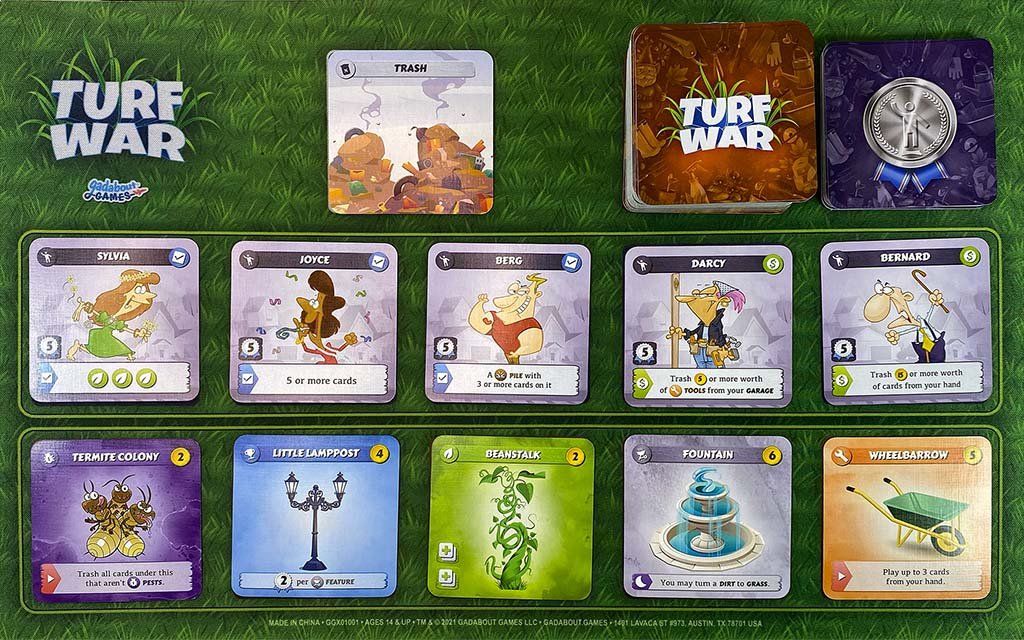
3. Shuffle the Store Deck. Put the top 5 cards from the Store Deck face-up in the center of the table (the Store).
The Store is a shared area that players will buy cards from as the game goes on.
4. Set the Trash card nearby (the Trash).
The Trash is where cards go after being “trashed” from another area.
5. Shuffle the Neighbor Deck. Put the top 5 cards from the Neighbor Deck face-up in the center of the table (the Unswayed emoji_people Neighbors).
The Unswayed emoji_people Neighbors are cards that players will try to claim for themselves over the course of the game, triggering the end of the game when the last one is swayed.
In a 3-player game, set one additional emoji_people Neighbor card aside facedown. In a 4-player game, set two additional emoji_people Neighbor cards aside facedown.
Your Turn
The player who most recently did yard work goes first.

1. Do all brightness_high Start actions in your Yard.
Do the brightness_high Start actions on cards in your Yard regardless of whether or not there are other cards on top of them.
Do your brightness_high Start actions in any order, but you must do all of them before moving on.
-
You have Garden and Bamboo on Piles in your Yard.
At the beginning of your turn, you decide to do Bamboo’s Start action first, taking Tulips from the Trash and putting it into your hand. Next, you do Garden’s Start action, playing the Tulips from your hand onto the Garden.
With both of your Start actions completed, you proceed with the rest of your turn, making the decision to be Home or Away for the turn.
Your next turn, you’ll repeat this process, once again doing Bamboo and Garden’s Start actions.
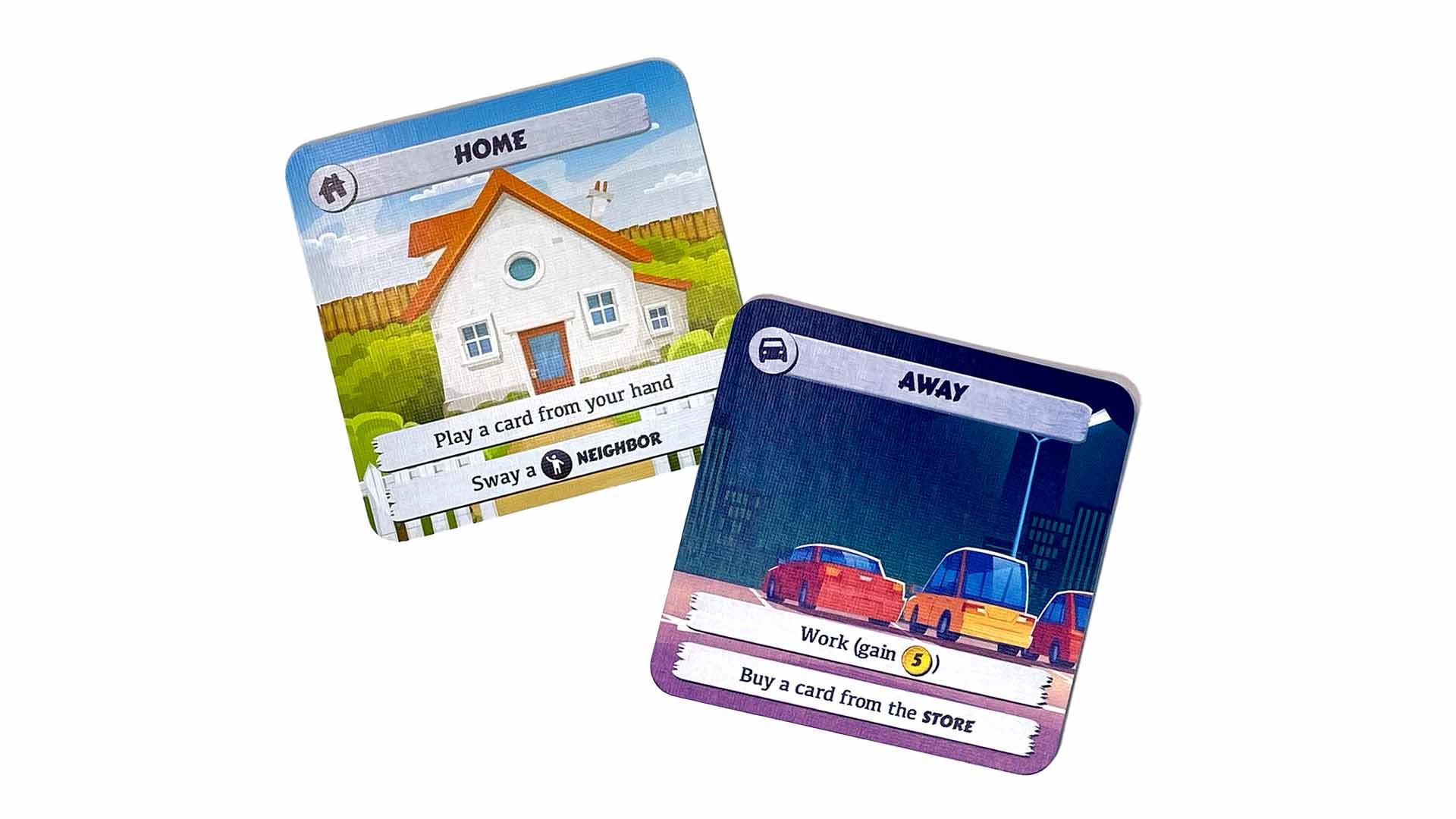
2. You may turn your Home / Away card to either house Home or directions_car Away.
You always choose which side you want face-up during your turn. You can leave the same side face-up multiple turns in a row.
When you go from directions_car Away to house Home, pick up all cards from your Garage and put them into your hand.
You must go from directions_car Away to house Home in order to get cards out of your Garage. Don’t pick up any cards when you stay house Home multiple turns in a row.
3. Do either or both actions from the face-up side of your Home / Away card.
Do the actions in any order and no more than once each.
When you’re directions_car Away, you can work once to gain $5, and you may buy one card from the Store.
When you’re house Home, you can play one card from your hand, and you may sway one emoji_people Neighbor.
-
You decide to go Away for your turn in order to get more cards. You flip your Home / Away card to its Away side.
You decide to do Away’s work action first, adding $5 to your Piggy Bank.
Next, you do Away’s buy action, buying a Pinwheel from the Store, paying $1 from your Piggy Bank and putting the Pinwheel into your Garage.
You’ve now completed all of your Away actions.
-
You decide to go Home for your turn in order to play a card that you bought during your last turn, when you were Away. You flip your Home / Away card to its Home side.
Because you went from Away to Home, you pick up all of the cards from your Garage and put them into your hand.
You decide to do Home’s play action first, playing Toolbox from your hand into your Garage. The Toolbox allows you to play two more cards. You use the first of these to play a Watering Can, turning a Dirt in your Yard to Grass. Then, using your last Toolbox play, you play Pinwheel onto the new Grass.
Next, you decide to do Home’s sway action. The Pinwheel was the third blue Ornament card in your Yard, so you are now able to sway Amelia. You take her from the Unswayed Neighbors row and put her in front of you, in your Sway.
You’ve now completed all of your Home actions.

4. Do all dark_mode End actions in your Yard.
Do the dark_mode End actions on cards in your Yard regardless of whether or not there are other cards on top of them.
Do your dark_mode End actions in any order, but you must do all of them before moving on.
-
You have Fountain and Rummaging Mutt on Piles in your Yard.
At the end of your turn, after you’ve completed your Home/Away actions, you decide to do Rummaging Mutt’s End action first, taking Tulips from the Trash and putting it into your Garage. Next, you do Fountain’s End action, turning a Dirt in your Yard to Grass.
With both of your End actions completed, your turn is now done.
Your next turn, you’ll repeat this process, once again doing Fountain and Rummaging Mutt’s End actions.
directions_car Away Actions

Working
When you work, add $5 to your Piggy Bank.
Buying a Card
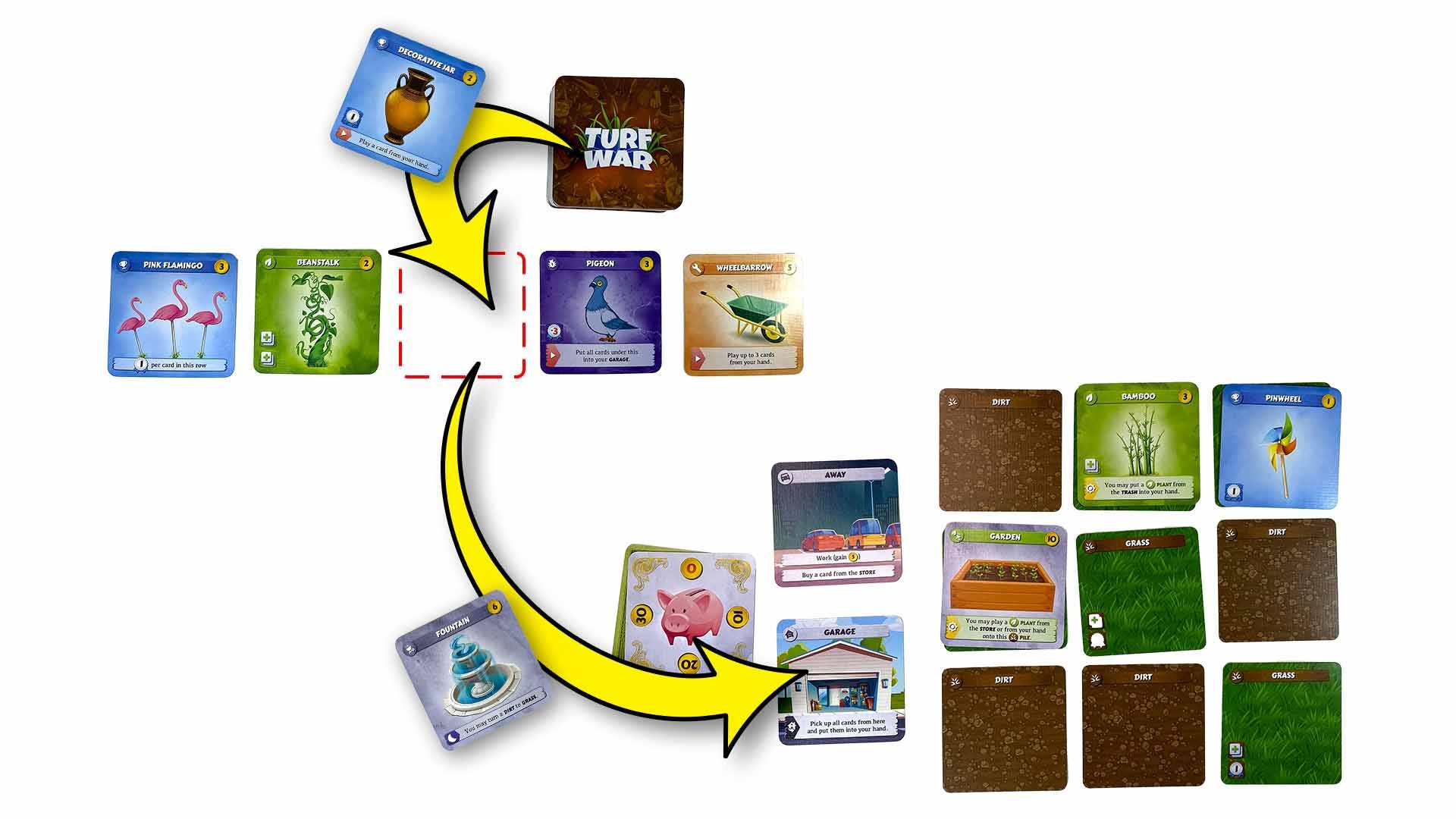
1. Select the card from the Store that you want to buy. Pay the card’s cost (in the upper right corner) from your Piggy Bank. Put the card into your Garage.
2. Restock the Store. (Reveal the top card of the Store Deck and then put it into the empty Store slot.)
When a card leaves the Store for any reason, restock.
When you reveal an flash_on Event while restocking, immediately do that flash_on Event’s action, then finish restocking. Unless instructed otherwise, put the flash_on Event onto the bottom of the Store Deck after you’ve done its action.
If an action has you buy or trash multiple cards from the Store at the same time, finish buying/trashing all of those cards before restocking.
house Home Actions
Playing a Card

build Tools
To play a build Tool (orange) card, reveal it, do its ▶ Play action, and then put it into your Garage.
-
On your turn, you go Home. You have a Watering Can, Toolbox, and Rake in your hand.
You do Home’s play action to play the Toolbox from your hand, revealing the Toolbox and putting it into your Garage. Toolbox’s play action takes effect, and you may now immediately play up to 2 cards from your hand.
You play the Watering Can by revealing it from your hand and putting it into your Garage. Watering Can’s play action takes effect, and you choose a Dirt in your Yard and turn that Dirt to its Grass side.
You have one more play remaining from the Toolbox, and you play Rake, revealing Rake from your hand and putting it into your Garage. You do Rake’s play action, deciding to trash one of the cards from the Store.
You’ve now completed Toolbox’s play action in full.

emoji_events Ornaments, eco Plants, and outdoor_grill Features
To play an emoji_events Ornament (blue), eco Plant (green), or outdoor_grill Feature (silver) card, put it face-up on top of any unoccupied library_add Place. (Any one card occupies one library_add Place.) Do the card’s ▶ Play action when it’s played onto your Yard.
The main way to get library_add Places in your Yard is by turning Dirt into Grass using your Watering Can.
Some eco Plant cards (like Tulips and Beanstalk) add more library_add Places, opening up spots where more cards can be played in the future. You can often stack many cards onto one grass Pile using eco Plants.
Only check library_add Places when you’re playing a card. If something later happens that changes the number of library_add Places in a grass Pile (like Grass turning back to Dirt), the cards in the grass Pile remain there.
-
You start the game by going Away, doing Away’s work action to gain $5 and Away’s buy action to buy a Pinwheel from the Store. You place the Pinwheel into your Garage and restock the Store.
On your next turn, you go Home, picking up the Pinwheel from your Garage and adding it to your hand (along with your starting Tools.)
You do Home’s play action, playing a Toolbox from your hand into your Garage. The Toolbox allows you to play 2 additional cards from your hand.
For the first Toolbox play, you play your Watering Can, putting the Watering Can into your Garage and turning a Dirt in your Yard to its Grass side.
There is now one Place available on the newly flipped Grass in your Yard. You use your second Toolbox play to play the Pinwheel from your hand, revealing the Pinwheel and putting it face up on top of your Grass’s Place.
The Pinwheel remains in your Yard for the rest of the game, unless something (like a Rake) removes it.
-
Over the course of the game so far, you’ve acquired a Beanstalk, Fountain, and Tulips from the Store. The cards are now all in your hand.
On your turn, you go Home and do Home’s play action to play your Toolbox into your Garage, allowing you to play 2 more cards.
For the first, you play your Watering Can into your Garage, turning a Dirt in your Yard to Grass. There is now one Place available on the Grass.
For the second, you play your Beanstalk onto the Grass Pile. The Beanstalk remains in your Yard and adds two more Places where you can put cards in that Pile.
You can’t play any more cards this turn, though, so you pass the turn.
On your next turn, you remain Home and do Home’s play action to play the Fountain from your hand onto the Pile with the Beanstalk, leaving one Place available in that Pile. You’re once again out of plays, so you do Fountain’s End action and then pass the turn.
On your next turn, you again remain Home and do Home’s play action to play the Tulips from your hand onto the Pile with the Beanstalk and the Fountain. This adds yet another Place to that Pile, allowing you to continue to build on the Pile in a future turn.

pest_control Pests
To play a pest_control Pest (purple) card, put the card face-up on top of any card or grass Pile. Do the pest_control Pest’s ▶ Play action when it’s played onto your Yard.
You can always play cards onto your own Yard, but you can only play cards onto a rival’s Yard when they’re directions_car Away.
pest_control Pests don’t require a library_add Place – so you can play them on top of Dirt or any other card – but they do occupy library_add Places, preventing other cards from being played there.
-
You’ve acquired a Skunk over the course of the game, and its currently in your hand.
On your turn, you note that your rival is Away. You decide to go Home.
You do Home’s play action, revealing the Skunk from your hand and putting it onto a Dirt in your rival’s Yard.
The Skunk is now affecting your rival as long as it remains in their Yard. They cannot sway Neighbors because of the Skunk’s ability. The Skunk will count as -5 victory points for them when scoring at the end of the game.
If your rival removes the Skunk from their Yard, these effects will end immediately.
-
You’ve acquired a Mosquito over the course of the game, and its currently in your hand.
On your turn, you note that your rival is Away. You decide to go Home.
You do Home’s play action, revealing the Mosquito from your hand and putting it onto a Grass in your rival’s Yard.
Immediately, your rival must do the Mosquito’s Play action, causing them to lose $5 from their Piggy Bank.
The Mosquito is now affecting your rival as long as it remains in their Yard. At the end of each of their turns, the Mosquito’s End action will trigger, causing them to lose an additional $5. The Mosquito also occupies the Grass’s Place, preventing your rival from playing another card there.
If your rival removes the Mosquito from their Yard, these effects will end immediately.
Swaying a Neighbor
1. Choose a emoji_people Neighbor in the Unswayed emoji_people Neighbors row.
You can't sway a emoji_people Neighbor that's already been swayed by your rival.

2.A. If the emoji_people Neighbor has check_box Criteria, your Yard must contain everything listed.
Only check check_box Criteria when you’re swaying a emoji_people Neighbor. The emoji_people Neighbor remains swayed even if the cards in your Yard later change.
-
Sylvia is in the Unswayed Neighbors row, and you want to sway her.
On your turn, you go Home. Doing the first of your Home actions, you play a Venus Flytrap from your hand onto your Yard. The Venus Flytrap is the third card in your Yard with a Plant symbol, so you can now meet Sylvia’s Criteria.
You do Home’s other action to sway Sylvia, taking her from the Unswayed Neighbors row and putting her in front of you, in your Sway. You’ll now count 5 victory points from Sylvia toward your score at the end of the game.
-
Florence is in the Unswayed Neighbors row, and you want to sway her.
On your turn, you go Home. You have 3 Grass in your Yard (each with one Place symbol) and one Beanstalk (with two Place symbols), so you now have 5 total Place symbols and can meet Florence’s Criteria.
You do Home’s action to sway Florence, taking her from the Unswayed Neighbors row and putting her in front of you, in your Sway. You’ll now count 5 victory points from Florence toward your score at the end of the game.
-
Joyce is in the Unswayed Neighbors row, and you want to sway her.
On your turn, you go Home. Doing the first of your Home actions, you play a Pinwheel from your hand onto your Yard. The Pinwheel is the fifth card in your Yard, so you can now meet Joyce’s Criteria.
You do Home’s other action to sway Joyce, taking her from the Unswayed Neighbors row and putting her in front of you, in your Sway. You’ll now count 5 victory points from Joyce toward your score at the end of the game.

2.B. If the emoji_people Neighbor has a monetization_on Bribe (green dollar sign), do the monetization_on Bribe.
You must be able to complete the monetization_on Bribe in full.
-
Maximilian is in the Unswayed Neighbors row, and you want to sway him.
On your turn, you go Home. You have $23 in your Piggy Bank, so you have enough to pay Maximilian’s Bribe.
You do Home’s action to sway Maximilian. To pay Maximilian’s Bribe, you deduct $20 from your Piggy Bank, leaving you with $3..
You take Maximilian from the Unswayed Neighbors row and put him in front of you, in your Sway. You’ll now count 5 victory points from Maximilian toward your score at the end of the game.
-
Thomas is in the Unswayed Neighbors row, and you want to sway him.
On your turn, you go Home. You have a Pigeon, a Beanstalk, and a Fountain in your Yard, so you have enough cards to pay Thomas’s Bribe.
You do Home’s action to sway Thomas. To pay Thomas’s Bribe, you pick up the Pigeon and the Beanstalk from your Yard and put them face-down into your rival’s Garage.
You take Thomas from the Unswayed Neighbors row and put him in front of you, in your Sway. You’ll now count 5 victory points from Thomas toward your score at the end of the game.
3. Put the emoji_people Neighbor in front of you ("in your Sway.")
In a 2-player game, don’t restock the Unswayed emoji_people Neighbors row after swaying a emoji_people Neighbor.
In a 3- or 4-player game, after a emoji_people Neighbor is swayed, restock the row with one of the set-aside emoji_people Neighbors, if any remain. (Do not use the full Neighbors Deck when restocking.)
The emoji_people Neighbors in your Sway aren't in your Yard.

Game End & Scoring
When the last of the Unswayed emoji_people Neighbors is swayed, the game ends.
In a 2-player game, the game ends when the fifth emoji_people Neighbor is swayed. In a 3-player game, the sixth emoji_people Neighbor. In a 4-player game, the seventh emoji_people Neighbor.
Add up workspace_premium VP from your Yard and Sway to determine your score. The player with the highest total workspace_premium VP wins.
In a tie, the player with the most emoji_people Neighbors in their Sway wins.
Watch It Played
Watch Spencer and Lara of the Lighten Up Initiative battle for neighborhood bragging rights by playing a game of Turf War.

Expansion Rules
Turf War: Trick-or-Treat
Changes in the 2nd Edition
Tools are no longer played to your Yard and then picked up and moved to your Garage as part of a cleanup step. Play Tools directly to your Garage instead.
It’s now optional to put cards facedown in your Garage. Your rivals are still not allowed to look through your Garage (unless a card like Crowbar instructs them to.)
Events are now placed onto the bottom of the Store Deck after being completed (unless otherwise instructed.)
Multiplayer rules have been incorporated into the main rules.
Versus the first edition (GGX01000), the second edition (GGX01010) removes some cards and changes quantities of others. The second edition does not include any new cards and can be constructed from two first edition copies. Download the second edition card list.

It’s big. It’s green. It’s full of fun! This eye-popping, neon green, deluxe storage box contains a Turf War (2nd Edition) base set, a Turf War: Trick-or-Treat expansion set, and a 4-player set of rubber-backed, neoprene playmats.
Outwit your next-door rival in this zany backyard battle. Pick up the best cards to build the perfect yard, win over your neighbors, and prove that your lawn is the best on the block. But be careful – every minute that you're away from home, you leave your yard vulnerable to your rival's mischief.
Every second-edition of Turf War contains 144 cards of pure suburban mayhem in an ultra-compact box. Each Trick-or-Treat expansion contains 72 new cards that mix into the base set.
Contents:
1 Turf War (2nd Edition) base set
1 Turf War: Trick-or-Treat expansion
4 Yard (player area) playmats
1 Store (common area) playmat
Deluxe storage box
2–4 players. 30 minutes. Ages 14 & up.